My stupit SSG
Written on: 2026/06/01
Tags: blogpost, programming, technical
Making webpages manually, while fun, can get tiring after a while. This is especially true when you have a website with lotsa pages. What do you do if you want to change something across multiple pages? Just copy and paste a bunch? Fortunately, a solution to this problem exists: Static Site Generators (shortened to SSGs for the rest of this post). You put in some files, such as templates, markdown, etc., and you get out a website. Awesome! Where do I sign up?
There are plenty of free and accessible SSGs out there with tons of documentation and large communities. Some notable ones that I've heard good things about include Hugo, Jekyll, and Eleventy. For this site, I have decided to use none of them. Because I am gay and stupid.

Why would you do this?
Self deprecating humor aside, I have what I think are fairly legitimate reasons for making my own SSG:
- I don't really want to learn yet another piece of software. There's already so much stuff I want to learn, I don't need another thing on my plate
- My own SSG means I can make it as specific to my website as I want
- I am basically guaranteed that my own system will still work in like 10 years (as long as I remember how it works)
- I just thought it would be a fun project :3
Making a whole SSG works particularly well for my site because it's just plain HTML and CSS. No Javascript or anything else fancy to worry about. I wanted to just get something out quick and dirty, so I opted for Python since I already have a good amount of experience with it.
Editor's note (it's me, I'm the editor): I tried not to get too technical with the explanation. The following explanation is very technical. Oops
Brief aside about Python
Python is awesome. I think more people should use it. It's actually perfect for a quick project. It's a bit of a pain to get all the libraries you need set up (what with virtual environments and all that) but once it's set up it just works.
I know a big issue with Python is performance but honestly, for a task like this, performance doesn't really matter. I'm okay waiting 500 extra milliseconds for my site to build.
Plus, the language used for the Godot Engine (another piece of software I think more people should use) is very similar to Python syntax-wise, so experience is transferrable. This was a huge help during this project.
What the SSG even does
I wanted to prioritize making more changes to my site (such as actually posting in the blog more than once every two years), so I mainly designed around making it not a huge pain to use.
Generate blog posts
I put in a markdown file, a json file containing basic info (like the post name, date, tags, etc), and any media in the post and the SSG automatically turns it into an HTML page. Since markdown doesn't really support image captions, I have it so I can just type two of { these } with the right arguments and it'll insert an image with a caption at the proper pace.

The things I can put are determined by what I dubbed "components", which are just snippets of HTML that get inserted into the page. The best part is that they can be whatever I want!
Generate browse pages
If you've spent any time poking around the blog portion of my site, you might have noticed that posts get assigned tags, and you can browse by a certain tag to see all posts with it. This is super useful, because it makes it super easy to find any of the 3 posts I've written.
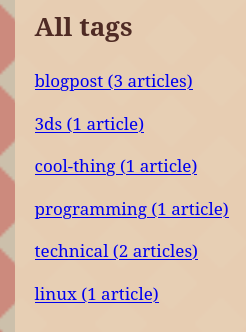
This is also handled by the SSG. After it generates all the blog posts, it finds all the tags associated with them makes a page for each tag. There's also a generic "blogpost" tag that gets put on all posts. This is so I can make the "browse all posts" page with no real headache. As a side effect, this means I can omit the "blogpost" tag to make a hidden post! Neat!
The navbar
Navbars are cool! Copying and pasting them to like 20 pages after making a change is not. Remember how I can insert images into a blog post with those funky curly braces? Well, I can also use those curly braces on any HTML page I so choose. I have a "nav" component containing all of the navbar code, so I can just write {component nav} on any page with the navbar and it'll show up there. If I want to make a change to the navbar, I only need to change the component!
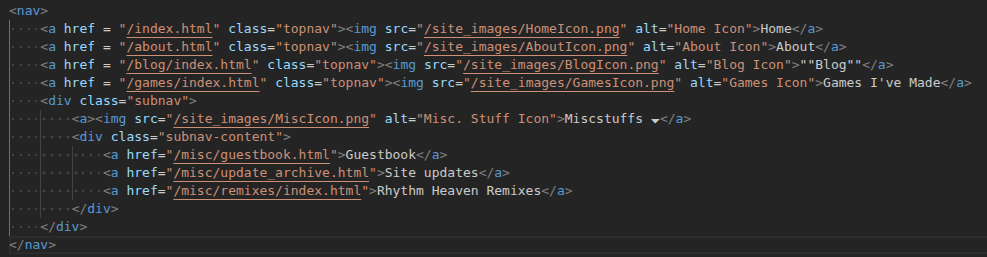
I could probably do this quicker and easier with some Javascript, but I'm committed to not using that for any essential website functionality.
Automatically push changes
Everytime I run the SSG, it does a quick scan on the output to see if any files are changed. With a flag, it'll automatically push all the changes to the site thanks to the Neocities API (and the amazing python wrapper around it, I could make my own post requests but that's a pain)
If I don't push the changes, it'll remember what files have been changed for when I eventually do push the changes.
Actually using the SSG
This SSG is in the form of a Python script and a few helper scripts (maybe 500 lines of code in all), a "components" folder, a "templates" folder (basically components but not meant to be placed anywhere arbitrarily) and the input folder. Every time I make a change, I can run the script and it'll go through all the steps in the previous section (as well as copying over non-html files, like the file downloads I have on offer). This takes about a second with the current size of the website.
I run this script all the time. So much that I even set up an alias for it (buildsite). I just make my changes, type buildsite in any terminal, and then all my changes are reflected in whatever local server I have running. If I do buildsite --push, all the changes will be uploaded to the website. This works super well and it makes making changes super easy as opposed to the huge pain it was before.
Future Plans
Of course, I'm not done with it. There are a few things I want to add in the future:
- Making components more generalized. Right now there's a high possibility that if I put a component somewhere it's not supposed to be then things will break horribly.
- Generating an RSS feed. Neocities does this automatically for all website changes (I think), but it would be nice to have an RSS feed specificially for my blog (especially for if/when I eventually move off of Neocities)
- Auto-generating the pages in the games section using markdown files
I probably won't implement these changes right away. I'll probably end up waiting until the last minute and adding them when I really need them. Such is the way of the programmer.
What you can do
Right now, the SSG (along with the input folder for the website, minus some big files) is currently open source (Note: The repository will likely be moved off Github sometime soon-ish). Take a peek at it! It's not too long, so if you want to repurpose it for your own website, go right ahead. It should be fairly straightforward, but I still need to write actual documentation for it (both for the public good and also so I remember what I'm even looking at 10 months from now. I already made that mistake once).
Is using my SSG better than using one of the free ones already available? Probably not. But you can! If you want!
Is making your own SSG better than using the free ones already available? Maybe, depending on your situation. If you have just a blog, probably not.
Conclusion paragraph
This was actually a really fun project, even though it took longer than it probably should have. I'm really happy with the results and I can see myself making changes to my website a lot more often now. In fact, this should hopefully be the first blogpost posted with the new system! Hopefully it works alright. We'll see...
While I'm not sure if I can recommend making your own SSG, I can definitely recommend doing small, one-off projects like this. It hones your skills, is fun to make, and the end result is something actually useful. It doesn't even have to be programming related!
Stay tuned for more posts. I will hopefully be switching from biyearly (once every two years) to biyearly (twice a year). Maybe even more! Until next time...